When Stocky stops being the place you manage buying, the purchase order does not go away. It moves into the Shopify admin, and the real question is what that move covers and what it leaves to you. A Shopify purchase order is a record and a tracking tool. It captures what you ordered from a supplier, the costs, and the expected arrival, and it updates incoming stock as goods come in. What it does not do is decide what to reorder, when to place the order, or how much to buy. Those are reorder planning decisions, and they sit on top of the purchase order rather than inside it. This guide walks through what native Shopify purchase orders cover after Stocky, where the gaps are, and what to settle before the cutoff so the buying side of your store keeps running.
What purchase orders do after Stocky
Start with the deadline, because it frames the move. Stocky will not be available after August 31, 2026, and from that date you manage inventory in the Shopify admin and Shopify POS instead. The purchase order is the part of Stocky most people worry about losing, and it has a native home. In Shopify, a purchase order records the products, their costs, and the quantities ordered from a supplier. It also tracks incoming inventory quantities, costs, payment terms, and an estimated arrival date, so the order stays visible from the day you place it to the day stock arrives. Tracking does not stop once the order is placed: as goods come in, the incoming quantities recorded on the purchase order are what you reconcile the delivery against, so a single order stays the reference point from placement through to receiving. For the end to end steps of running that cycle in the admin, see the Shopify purchase order workflow after Stocky. The point to hold onto is that the admin gives you a place to record and track an order you have already decided to place.
What Shopify can cover natively
Beyond the order itself, the admin covers more of the execution layer than people expect. Suppliers are created in the Shopify admin at the point you build a purchase order, so the vendor record and the order live together. For the stock numbers a buying decision reads from, Shopify inventory CSV files can export current inventory quantities and update quantities for products in each location, and the On hand column is what you use to set the units physically present at a location. Counts done in Shopify POS feed the same numbers. Put together, purchase orders, supplier records, CSV exports, and counts mean the admin holds your order history and the on-hand figures. That is the raw material a plan reads from, and it is worth knowing it is already there before you reach for anything else. Recording the costs on each order also keeps your cost of goods in one place, which matters the moment you start judging which products are worth reordering at all and at what margin. For the wider question of which tools to move to, see what to use after Stocky.
What purchase orders do not decide for you
What the admin does not do is tell you which products to reorder, when, or how much. It records a purchase order once you decide to place one, but it does not flag which items are approaching their reorder point or roll several orders into a single buying plan. Two native limits make the boundary concrete. Purchase order APIs are not currently available in Shopify and are under consideration, so you cannot fully automate purchase order creation from an outside system today. And while you can download a purchase order as a PDF from the admin, you cannot email it to a supplier directly from the admin, so sending it stays a manual step. These are not complaints about the admin so much as a map of its edges: it is built to record and move an order, not to originate the buying decision behind it. Shopify also notes that some Stocky-specific features might work differently or might not yet be available in Shopify, so a feature-for-feature swap is not a safe assumption. The decision of what to buy still has to be made somewhere, and that somewhere is reorder planning. See reorder planning after Stocky for how that decision is framed, and CSV vs PDF purchase orders for what stays in a working list before the order becomes a downloadable PDF.
Reorder planning comes before the PO
It helps to put the purchase order at the end of a short sequence rather than the start. Reorder planning is the work of deciding what to reorder, when to reorder it, and how much to buy, and all three happen before a purchase order exists. The purchase order is where that decision gets recorded once it is made. For most stores the planning layer starts as a spreadsheet built from the exported counts and order history the admin already holds, and it stays a spreadsheet until the manual upkeep outweighs the cost of a focused tool. The reason to keep the two apart in your head is that mixing them is what makes the move off Stocky feel harder than it is. Recording an order is a solved problem in the admin. Deciding the order is the part that needs a home. Picture the sequence in practice. You notice a strong seller is about a week from running low, you confirm the supplier needs ten days to deliver, you settle the quantity from recent sales and your budget, and only then do you open the purchase order to record what you decided. Many stores make that decision on a fixed schedule, working a weekly reorder list before purchase orders so the order screen only records a choice already made. The admin is good at that last step and silent on the first three. The running workflow for keeping stock topped up is covered in inventory replenishment after Stocky.
What to check before creating a purchase order
Before you open a new purchase order, a short checklist keeps the order pointed at the right products. Check current inventory first, using the on-hand counts you can export from the admin, so you are working from real numbers rather than memory. Check days of inventory remaining, the rough horizon for how long current stock lasts at recent sales rates, so timing is based on movement. Check the reorder point for the item, the level at which you need to act so stock on hand still covers the supplier delivery window; working that out is its own task, covered in Shopify reorder points after Stocky. Check supplier lead time, because a slow supplier moves the reorder point earlier. And check whether the item is dead or slow moving before you buy more of it, since a low quantity on something that is not selling is usually a signal to stop ordering it, not to restock. None of these checks arrives as a single reorder report; you assemble them from the exports and your own read of the numbers, and the value of running them in order is that each one can stop a weak order before it is placed. Collecting those checks into one place is the job of a buy list before creating a purchase order, the review step where each item earns its quantity and a reason before the order is opened. It is also worth asking whether the restock is really a reorder or a transfer between your own locations; see reorder versus transfer.
Where supplier reliability changes the PO decision
Supplier reliability is the quiet input that changes both when you order and how much. The reorder point for any product is really a question about lead time, because you have to reorder while the stock on hand still covers the days the supplier takes to deliver. When a supplier runs late, a reorder point that looked safe turns into a stockout, because the buffer was sized for a delivery window the supplier did not hit. Reliability also affects quantity: a supplier you trust to deliver on time lets you hold a smaller buffer, while one that slips pushes you to order earlier or larger. The admin records the purchase orders that hold this history, but it does not score suppliers for you, so turning a vague sense of which suppliers slip into a number you can plan around is one more job that sits in the planning layer. Following through on a late or short delivery is part of the same picture, and the order record in the admin is where you see what was promised against what arrived. Receiving against the purchase order is where that reliability becomes visible, because comparing the quantity received to the quantity ordered, on the date that was promised, is the raw signal for whether a supplier can be trusted. Kept across many orders, that signal is what tells you which suppliers need a larger buffer and which have earned a smaller one. Acting on a supplier who keeps slipping before the next order is late supplier purchase orders.
Where a dedicated reorder planner fits
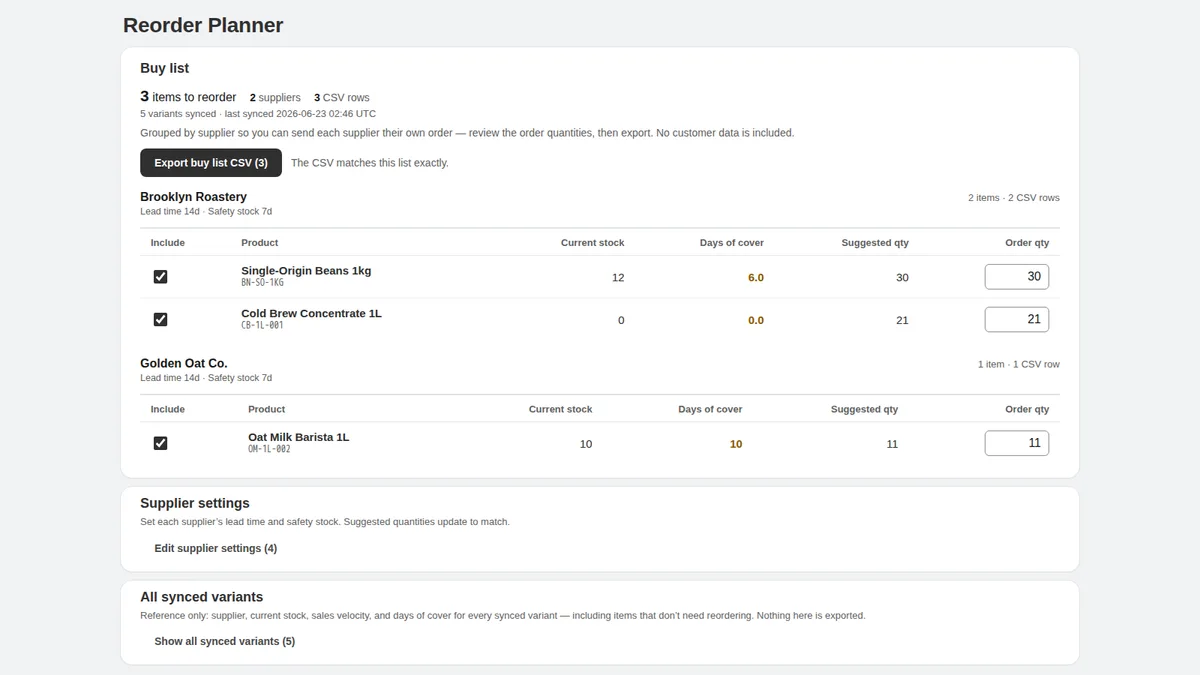
If the planning layer becomes too much to hold in a spreadsheet, a focused tool is one way to carry it, and a dedicated reorder planner now exists for exactly this gap. Kijun Reorder Planner is aimed at the reorder-list step: it builds supplier buy lists from recent sales and stock, groups reorder items by supplier, and lets you adjust quantities before exporting — you can save buy lists for later, and export CSV/PDF buy lists when the numbers look right. It is worth being plain about what it is not. It is read-only by design: it does not create Shopify purchase orders, which stay native to the Shopify admin, it does not write inventory changes back, it does not use customer names, emails, phone numbers, addresses, or payment data, and it does not forecast demand. Kijun Reorder Planner is available on the Shopify App Store, and nothing in this guide depends on it — a spreadsheet you control still works if you prefer to start there.
What to do before August 31, 2026
The checks above depend on data that is far easier to pull while Stocky still runs, so the order of operations matters. Export the counts, purchase orders, and any history you want to plan from before the cutoff, because historical Stocky data, including old purchase orders and stocktakes, will not move into Shopify automatically after the shutdown. Suppliers in particular cannot be exported from Stocky, so capture those records by hand before the date. Rebuild your active purchase order process in the Shopify admin so the team knows where ordering now happens, and create your suppliers there as you go. Then set your reorder points and a simple way to track what is moving, even if that starts as a single spreadsheet. For the step-by-step of the move itself, the Stocky migration checklist covers the sequence to follow. Put the export and supplier-capture steps on the calendar now, because read-only export access runs only for a limited period after the cutoff and the app stops being usable for day-to-day work on that date.
Limitations
This guide frames what Shopify purchase orders cover after Stocky, and it is not meant to cover every workflow Stocky used to support. Reorder points and buying quantities are judgement calls you make from your own numbers, so treat any checklist as a starting point a person reviews, not an instruction to follow blindly. Purchase order creation stays native to Shopify, and none of this is demand forecasting. If a focused tool fits how you work, the reorder planner described above is one option for the planning layer. Try Kijun Reorder Planner.
This article was drafted with AI assistance and checked against cited sources through kijun’s editorial workflow. Last updated: 2026-07-03.
Stocky and Shopify are trademarks of Shopify Inc. kijun is not affiliated with or endorsed by Shopify.