A CSV-style working list and a Shopify purchase order are two formats for two stages of the same job, and using the right one at the right time keeps buying decisions from getting locked in too early. While you are still reviewing what to buy, how much, from which supplier, and when, the work belongs in a flexible list you can edit freely, the kind most stores keep as a spreadsheet or CSV. Once you have reviewed the decision, you record it as a Shopify purchase order, the native order that holds what you bought and that you can download as a PDF from the admin to send to a supplier. The point of telling the two stages apart is practical: keep the part of the decision that is still moving in a list you can rewrite freely, and let the purchase order capture the version you have committed to. It is a working habit rather than a rule the software enforces. Stocky will not be available after August 31, 2026, and from that date you manage inventory in the Shopify admin and Shopify POS, so this split is something you now run yourself. Here is what belongs in each before you buy.
CSV vs PDF purchase orders: the practical difference
The two formats describe two stages of one job, and the difference is about whether the numbers are still moving. A working list is editable by design: quantities, suppliers, and timing all change as you review, so the file has to change with them, which is why a spreadsheet or CSV fits the stage. A purchase order is built to hold a decision rather than host one. A Shopify purchase order records the products, their costs, and the quantities ordered from a supplier, so it reads as a record of what you settled on. Shopify does let you keep one as a work in progress, since a Shopify purchase order can be saved as a draft while you build it and then marked as ordered when you place it with the supplier, so the line between the two stages is one you draw, not one the admin forces. The reason to draw it is that the order screen is organized around a single settled order, while the deciding is messier than that. Shopify also gives you a native CSV that feeds the working stage: Shopify inventory CSV files can export current inventory quantities and update quantities for products in each location, so the counts your list reasons from come straight from the admin. Reading the two as working format versus order of record, rather than as rival tools, is what keeps each one doing the job it is good at.
Use a CSV-style working list while quantities are still changing
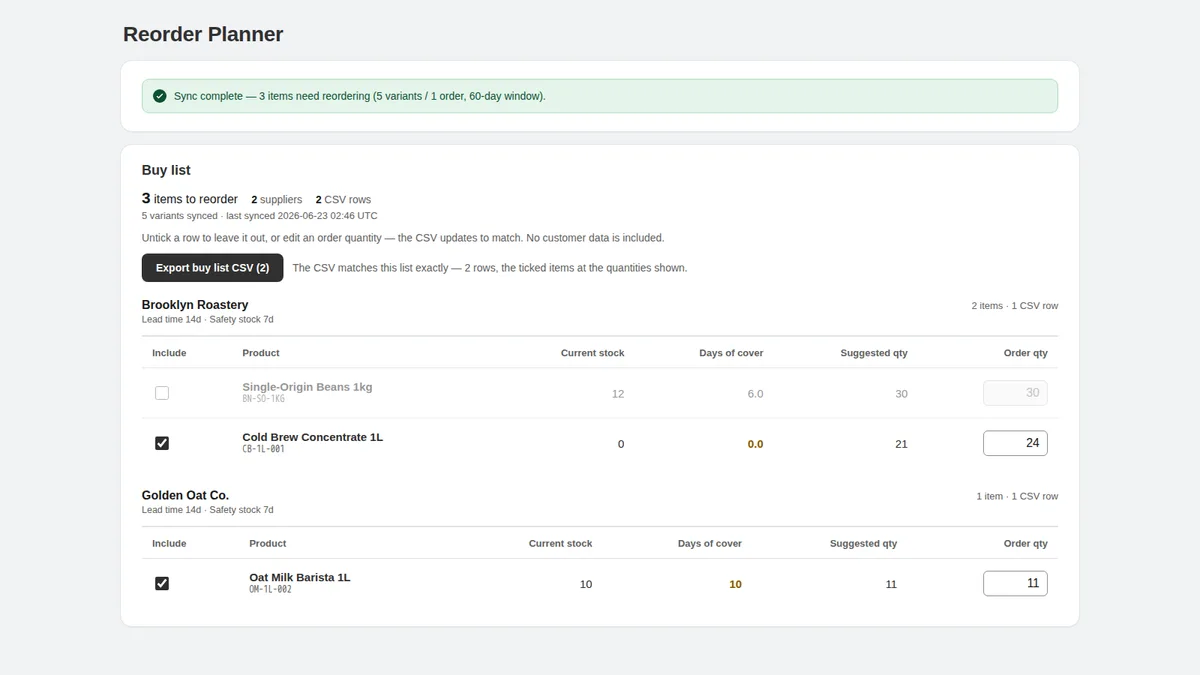
The working list is where buying decisions are allowed to be messy, and that is its value. It is not a native Shopify feature; it is a planning artifact you keep yourself, built from the counts and order history Shopify already holds. While you review, rows get added, quantities get revised up and down, an item moves from this week to next, and a supplier swap changes everything downstream. A purchase order is an awkward place to keep absorbing that churn, but a spreadsheet or CSV is built for it, which is why the deciding happens there. The running view of what is getting low feeds this list, the subject of inventory replenishment after Stocky, and the list itself is the buy list after Stocky you review before any order. Keeping the work in an editable format until the decision is settled is what stops a half-finished thought from becoming a real purchase order.
Create the purchase order after the buying decision is reviewed
The purchase order is most useful once the deciding is largely done. Once a row reads order this many of that item from this supplier, with a reason, the order screen is mostly writing down a settled choice. In Shopify, suppliers are created in the admin when you create a purchase order, so the vendor and the order are recorded together, and Shopify purchase orders track incoming inventory quantities, costs, payment terms, and an estimated arrival date. That is a lot of structure to fill in, which is why it works best as the place a reviewed decision lands rather than the place you make it. You can save a draft and revise it, but doing the bulk of the deciding in the working list keeps the order from becoming a second place you negotiate with yourself, and keeps you from committing a quantity you were still unsure about. The buy list is where the on-hand figure, the days of cover, the reorder point, and the lead time come together into a quantity and a yes; a fuller map of the native order is in Shopify purchase orders after Stocky, and the wider decision is framed in reorder planning after Stocky.
What belongs in the working list
Everything that can still change belongs in the working list, and only there. That means the candidate items and their current counts, read from the admin so the numbers are real: the On hand column in the Shopify inventory CSV is used to set or update the units physically present at a location, and counts done in Shopify POS feed the same figures. It also means the moving parts of the decision: the recent sales pace, the days of cover, a draft quantity you are still adjusting, a note that an item might wait, and a reorder point that flags when waiting gets risky, covered in Shopify reorder points after Stocky. Working notes belong here too, the half-formed reasons and the maybes, because the working list is the one place they will not contaminate a finished record. If a detail is still a question, it stays in the working list until it has an answer.
What belongs in the purchase order record
The purchase order should hold only what was actually decided, and in the form a supplier and your own records can rely on. That is the settled quantity, the agreed cost, the supplier, the payment terms, and an estimated arrival date, the same details a Shopify purchase order records once you create it. What does not belong is the deliberation: the maybes, the draft quantities, the items you were weighing but did not order. A purchase order that carries leftover uncertainty is harder to trust later, when you are checking what was agreed against what arrived. Keeping the record clean is also what makes supplier review meaningful afterward, since a tidy order history is the raw material for judging how each supplier actually performed. The rule is simple: the working list holds the thinking, and the purchase order holds the decision.
When a purchase order PDF helps with supplier communication
The PDF is where the finished order leaves Shopify, and it is worth understanding what that handoff is. Shopify purchase orders can’t be emailed to suppliers directly from the Shopify admin; you download the purchase order as a PDF and send it yourself, through email or whatever channel that supplier uses. So the admin holds the canonical record, and the PDF is the portable copy your supplier reads. That is genuinely useful: a PDF is a shareable snapshot of exactly what the order says, easy to file alongside the email thread and easy for a supplier to act on. You can download that PDF at the draft stage too, which is handy for an internal check, but the copy you send a supplier reads as a real order, so settling the numbers in the working list before you share it keeps the handoff clean. One limit to plan around is outside automation: purchase order APIs aren’t currently available in Shopify and are under consideration, so a third-party or custom tool cannot create purchase orders for you through those APIs today. And because you download the PDF and send it yourself, getting the finished order to a supplier stays a hands-on step. Grouping the working list by supplier first, the idea behind a supplier-ready buy list, makes that manual handoff quick.
How supplier review changes the format
Suppliers are the reason the working list and the finished order need to stay separate, because supplier details are what turn a rough quantity into a real order. Lead time decides timing, minimums and pack sizes decide how much, and which supplier an item comes from decides how the list is grouped, all of which you settle while the list is still editable. Running the working list on a fixed cadence keeps those details current, the idea behind the weekly reorder list, where each cycle you confirm what is ready to order and what still needs a supplier check. Once a supplier block is settled, it becomes one purchase order, and the format flips from working to finished. The order history that builds up this way is also what later tells you how each supplier performed, so a clean handoff from list to order pays off well beyond the single purchase.
CSV vs PDF review checklist
Before you turn any working row into a purchase order, run it through the same short review so nothing half-finished gets committed. First, the current on-hand count, read from the admin export rather than memory. Second, the recent sales pace and days of cover, so the quantity is anchored to real movement. Third, the supplier, lead time, and any minimum or pack size, since those decide both how much and when. Fourth, the quantity itself, settled rather than drafted. Fifth, a one-line reason, so the order is defensible when you check it against what arrives. Sixth, a final read for anything still uncertain, which stays in the working list rather than going into the order. Once a row passes all six, it is ready to become a purchase order, recorded in the admin and downloadable as a PDF to send. One timing note frames the habit: historical Stocky data, including old purchase orders and stocktakes, will not move into Shopify automatically after the shutdown, so export the order history you plan from before the cutoff. The Stocky migration checklist covers that sequence, and what to use after Stocky frames the wider tooling choice.
Limitations
Keeping a working list and a purchase order in different formats is a review habit, not a Shopify feature, and this guide does not cover every workflow Stocky used to support. It does not create Shopify purchase orders; those stay native to the Shopify admin, and this split only governs when you create one and what you put in it. None of it is demand forecasting, and the quantities you settle on are judgement calls a person reviews, not numbers to follow blindly. It is not legal, accounting, tax, or financial advice. It does not replace your own review of each product, and it does not promise that you avoid every stockout, overstock, or piece of dead stock. Shopify purchase orders, suppliers, inventory records, and inventory reports still need source-backed checks against your own store. For the working-list step itself, Kijun Reorder Planner is one option, scoped honestly: it builds supplier buy lists from recent sales and stock, groups reorder items by supplier, and lets you adjust quantities before exporting — you can save buy lists for later, and export CSV/PDF buy lists when the numbers look right. It is read-only by design: no inventory write-back, no native Shopify purchase order creation, and no use of customer names, emails, phone numbers, addresses, or payment data. Kijun Reorder Planner is available on the Shopify App Store. Try Kijun Reorder Planner.
This article was drafted with AI assistance and checked against cited sources through kijun’s editorial workflow. Last updated: 2026-07-03.
Stocky and Shopify are trademarks of Shopify Inc. kijun is not affiliated with or endorsed by Shopify.